What happens when you sort a list of Months in the Year in Ascending Order? You will get “April, August …, etc.” And that, I guarantee, is not what you want! So, how do you get the list to sort as “Jan, Feb, Mar, … etc.?
Sort Using a Custom List
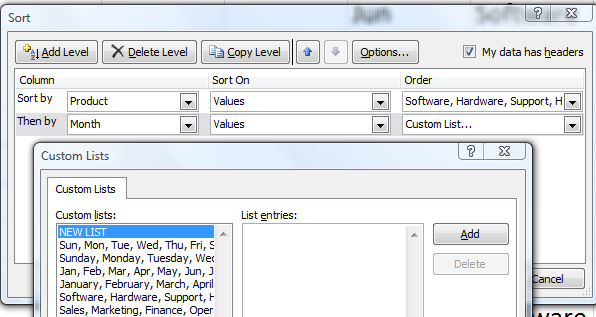
Sort on Custom List
The months of the year and the days of the week are Custom Lists that are built into Excel by default. You can also create your own Custom Lists – e.g. a list of department in the order that you want to see them displayed. Once you have a Custom List saved in Excel, you can choose to sort using this order.
Watch this short video lesson to see how to create a Custom List and also how to Sort Using a Custom List in Excel.
High Definition, Full Screen Mode on YouTube
Here is the link to watch this video on my YouTube Channel – DannyRocksExcels
Learn More About Custom Lists in Excel
I have identified “Creating Custom Lists to AutoFill and Sort By” as an Essential Skill in Excel. I have created a four-hour comprehensive video training package that covers the “Nine Essential Skills in Excel.” Click on these links to learn more about my video training resources:
- “Nine Essential Skills for Excel 2010” – Four-hour video training resource
- “Nine Essential Skills for Excel 2007” – Four-hour video training resource



Speak Your Mind